
Here’s something we see all the time: someone buys a Showit template, starts swapping in their content, and two weeks later realizes their pages don’t actually connect to anything they sell.
Planning your Showit website site map before you touch a single canvas feels like extra work upfront and saves you a lot of backtracking. We’ve been building websites since 2013. Trust us on this one.
Pin this post for later:

Start With Your Goals, Not Your Pages
Before you think about pages, get clear on three things:
- What action do you want visitors to take?
Buy something? Book a call? Download a freebie? This is your primary call to action and everything on your site should point toward it.
- What problem are you solving?
If you can’t say it in a sentence, your visitors won’t figure it out either. Try this: “I help [who] with [problem] so they can [result] without [pain point].” Example: “I help small business owners show up online with polished brand photos so they can attract dream clients, without booking a costly shoot every season.”
- What’s your tagline?
The one line in your hero section that tells someone in three seconds whether they’re in the right place. Clear beats clever every time. Try this: [Who you help] + [What you help them do] + [The result they get]. Example: “Brand photography for founders who want to look polished without a full creative team.”
Lock those in first. Everything else flows from them.
Map Your Offer Ladder Before Your Pages
This is the step most people skip, and it’s the one that makes the biggest difference in whether your site actually converts.
Your offer ladder is the progression from lowest to highest commitment:
Free Offer
Something you give away for an email address. Its job is to get someone into your world. (This Free Showit Starter Template? That’s ours.)
Entry Offer
A low-cost first purchase, sometimes called a tripwire. Once someone buys at any price point, they’re significantly more likely to buy again.
Signature Offer
Your main thing. Your flagship product or service. This is where most of your revenue lives.
Loyalty Offer
Something for existing customers who want to go deeper — a membership, retainer, or advanced product.
Every offer needs its own pages. A free offer needs a sign-up page and a thank you page. An entry offer needs a sales page. Your signature offer needs a sales page. Map your offers first, then your pages.
Now Map the Pages
With your goals and offer ladder clear, the pages get straightforward.
Primary Nav
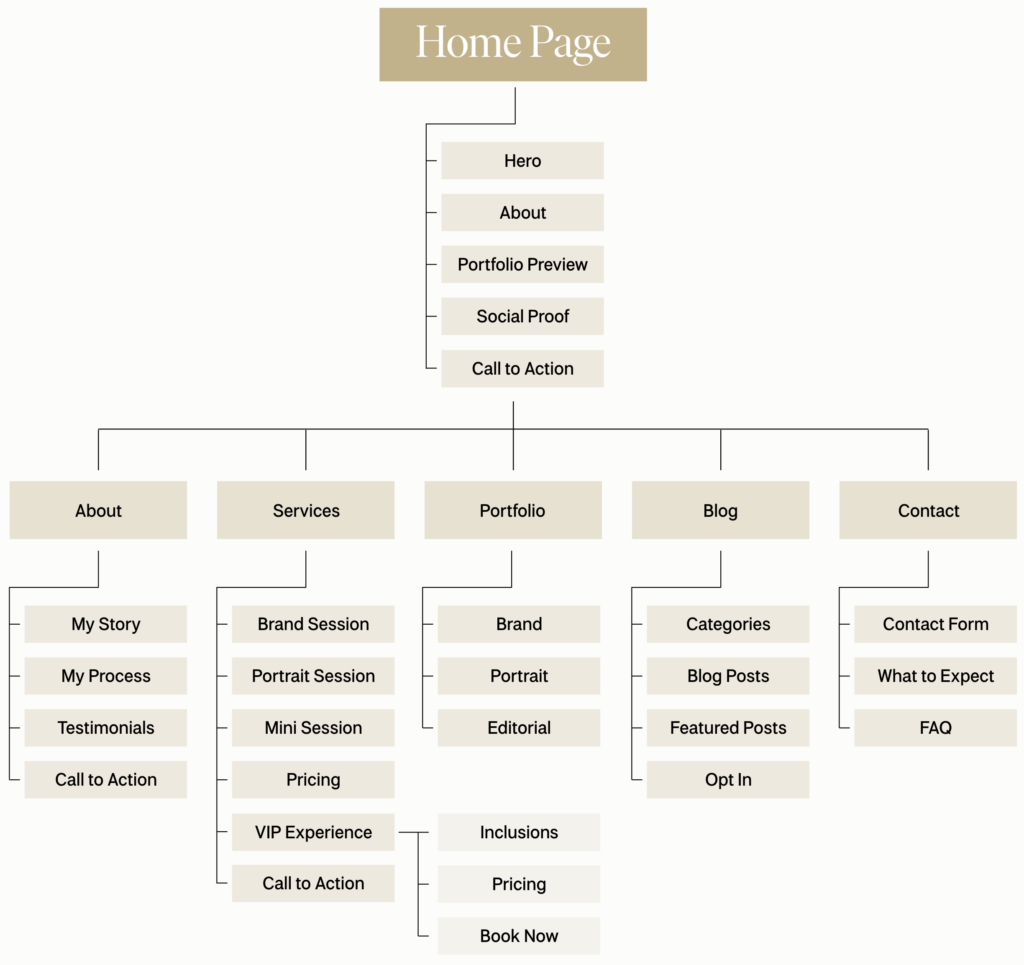
Five items max. Home, About, Services or Shop, Blog, Contact. Every nav page should connect to your CTA or build the case for it.
Home Page
Before you open a template, map the sections that live on your home page. Knowing what you need upfront saves a lot of rearranging inside Showit later.
Core Pages
Some are obvious (About, Services, Contact). Beyond that, only add what your business actually needs — testimonials if social proof drives sales, FAQ if you answer the same questions constantly, a resources page if you have affiliate relationships worth highlighting.
Footer Nav
Header nav is for action. Footer nav is for everything else — legal pages, secondary links, anything useful but not front and center.
Offer Pages
These are the pages from your offer ladder diagram above — they just don’t live in your nav. Every offer needs at minimum a landing page and a thank you page. Don’t treat them as afterthoughts.
A Few Things Worth Knowing
Keep your nav short. Every extra item is a decision you’re asking your visitor to make. More decisions, more friction.
Don’t waste your thank you pages. When someone opts into your freebie, that’s a warm audience. Use the thank you page to introduce your entry offer instead of just saying “check your email.”
Your site map will change. That’s fine. The point is to build with intention, not to get it perfect on the first try.
Ready to Build?
Got your site map sorted? Our Showit templates are built with page structure and conversion in mind — layouts that actually guide your visitor somewhere.
Browse the Northfolk template shop →
Resources:
- Learn more: northfolk.co
- Instagram: @northfolkco
- Shop: Templates for Creatives
- Learn: Revolving Revenue
Pin this post for later!